How to install IPTV on Android Devices
How to Install Our App
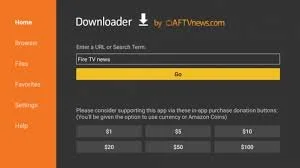
Go to the App Store and download Downloader by AFTVnews.
Video tutorial(Downlaoder): https://www.youtube.com/watch?v=YKIkNwtk5v8
Once Downloader is installed, you may need to enable it:
Go to Settings > My Fire TV > Developer Options.
Turn Install Unknown Apps (or Unknown Sources) ON for the Downloader app.
If you don't see Developer Options, go to Settings > My Fire TV > About, highlight your Fire TV device, and press the Select/OK button on your remote 7 times to unlock Developer Options. Then return and enable Downloader.
Open the Downloader app and enter the following code in the search bar:
9237472
This will prompt you to install TiviMate. Select Install.
Once installed, open TiviMate and select Add Playlist.
If multiple servers are displayed, select the server(s) specified in your login details.
Enter the Username and Password provided for your free trial.
The app will download your playlist. This may take a few moments.
Once the download is complete, you'll have access to Live TV, Movies, Series, Sports, and more!